

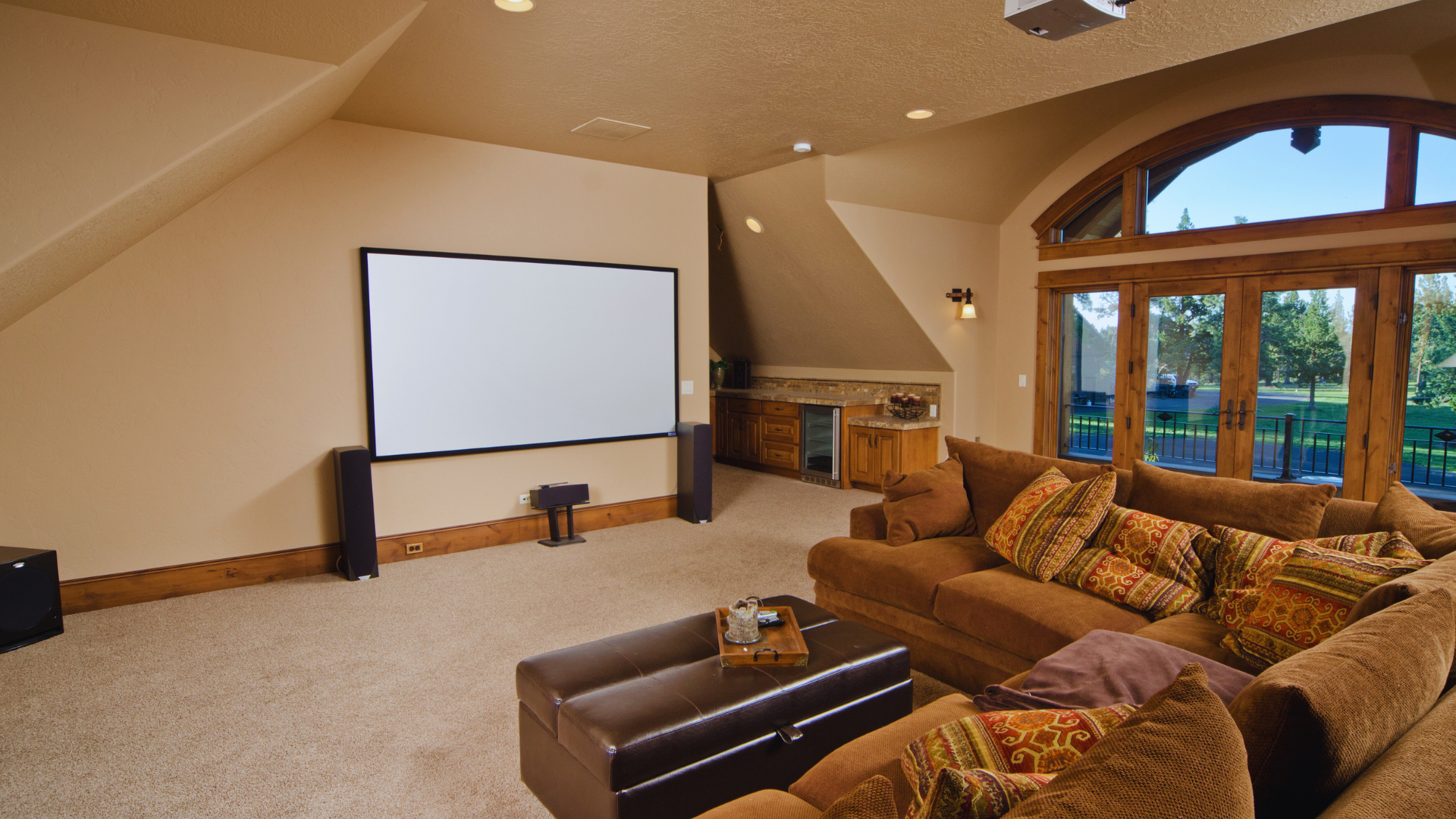
Setting up a home theater system can transform the way one experiences movies and music. To create an immersive home theater, it is essential to choose the right components, including a high-definition television or projector, a quality sound system, and comfortable seating. Understanding these basics can guide an individual through the selection process and help them avoid common pitfalls.
A successful setup also requires attention to layout and acoustics. The placement of speakers, furniture, and the screen plays a significant role in sound quality and viewing experience. Choosing the right room and adjusting the environment can enhance overall enjoyment.
With the right guidance, anyone can create a space that rivals a movie theater. Whether for family movie nights or binge-watching favorite series, a well-organized home theater system elevates entertainment to a new level.
Understanding the Components of a Home Theater System
A home theater system consists of several key components that work together to provide an immersive viewing experience. Each part plays a specific role.
- Display Device
This includes TVs or projectors. The size and resolution affect viewing quality. Popular choices are 4K and smart TVs. - Audio System
This usually comprises a receiver and speakers. A surround sound setup typically includes multiple speakers, enhancing audio depth. Common configurations are 5.1 and 7.1 systems. - Source Devices
These are devices like Blu-ray players, streaming boxes, and gaming consoles. They provide the content to be displayed. Compatibility with the receiver is essential for best performance. - Cables and Connectors
High-quality HDMI, optical, and speaker wires are necessary for connecting components. Proper cabling ensures the best audio-visual quality. - Remote Control
A universal remote can streamline operations. It allows the user to control multiple devices from one interface. - Furniture and Accessories
Comfortable seating and proper lighting enhance the viewing experience. Accessories can include projection screens and soundproofing materials.
Each component should complement the system’s overall performance and fit the user’s preferences and space. Selecting the right components involves understanding the individual roles they play.
Planning Your Home Theater Layout
Creating an effective home theater layout involves careful consideration of multiple factors. Dimensions, seating arrangements, screen and speaker placements, and lighting all play critical roles in delivering an optimal viewing experience. In this regard, guidance from specialists can make a significant difference in customizing a home cinema setup that can harmonize with the room’s layout and enhance overall enjoyment.
Room Dimensions and Acoustics
Room dimensions significantly impact sound quality and viewing comfort. For an ideal setup, a rectangular room is generally more favorable than a square one. A width-to-length ratio of about 1:1.5 allows for better sound distribution and viewing angles.
Acoustic treatment is also vital. Soft furnishings like carpets and curtains can absorb sound and reduce echo. Adding acoustic panels on walls helps manage sound reflections. Ideally, a room with minimal parallel surfaces will diminish standing waves and enhance audio clarity.
Seating Arrangements
The seating position directly affects the viewing experience. It’s essential to maintain a distance from the screen that balances comfort and immersion. A common guideline is to sit about 1.5 to 2.5 times the diagonal screen size away.
Arranging seating in a tiered layout can improve sightlines for all viewers. Use wide, comfortable chairs with proper support. Incorporate removable cushions or ottomans for extra comfort, allowing flexibility in arrangements.
Screen Placement
Screen placement determines the visual experience quality. The ideal height is at the viewer’s eye level when seated. This generally means the center of the screen should be approximately 40 to 42 inches from the floor, depending on seating height.
Additionally, the screen should be positioned to avoid glare from windows or lights. Using an appropriate screen size enhances image clarity and detail. For larger rooms, consider a screen size that is at least 100 inches diagonally for a cinematic feel.
Speaker Placement
Speaker placement influences sound direction and quality. Front speakers should be equidistant from the viewing position and positioned at ear level when seated. Placing the left and right speakers slightly angled towards the listener creates a broader soundstage.
Subwoofers can be trickier. They should be placed near a wall for better bass response. Experimenting with different positions can help find the spot that offers the best sound immersion.
Lighting Considerations
Lighting sets the mood within a home theater. It is crucial to have control over ambient lighting to avoid glare on screens. Ideally, install dimmable lights and blackout curtains to enhance viewing.
Consider using LED strip lights or wall sconces to provide indirect lighting. These can create a cinematic atmosphere without being distracting. Brightness and color temperature should be adjustable to accommodate various movie genres or viewing preferences.
To ensure all these elements work together seamlessly, it is often highly recommended to consult professionals specializing in Las Vegas Home Theater installation (or similar services in other areas). Their expertise could transform a homeowner’s vision into a fully optimized entertainment space tailored to the specific layout and lifestyle.
Selecting Your Home Theater Equipment
Choosing the right equipment for a home theater system is crucial for achieving the best audio-visual experience. This process involves making informed decisions on various components that work together seamlessly.
Choosing a Display
Selecting a display is essential to enjoy movies and shows at their best. Options include LED, OLED, and LCD screens, each offering different picture qualities.
- LED TVs generally provide good brightness and color accuracy.
- OLED displays offer superior contrast and viewing angles, making them popular for cinematic experiences.
- Resolution choices such as 4K and 8K can enhance picture quality.
Consider the viewing distance and space available. A rule of thumb is to sit at a distance 1.5 times the screen size for 4K displays. Additional features like HDR (High Dynamic Range) can improve contrast and color reproduction.
Picking Out Speakers
Speakers significantly impact audio quality. For a comprehensive setup, a 5.1 or 7.1 surround system is typical.
- Front speakers should be matched in quality for consistent sound.
- Subwoofers are essential for bass and can vary in size and power.
- Surround speakers enhance immersion, especially in action scenes.
Consider wireless options for easier placement. Brands like Klipsch, Bose, and Sony offer reliable choices. Pay attention to Wattage and frequency response for the best sound experience.
Selecting a Receiver
The receiver acts as the control center for your home theater. It connects various audio and video sources and powers speakers.
Look for features such as HDMI inputs, 4K passthrough, and Dolby Atmos compatibility. A good receiver supports multiple formats and has enough power to drive your speakers efficiently.
Connectivity options like Bluetooth and Wi-Fi enhance versatility. Brands like Denon, Yamaha, and Onkyo are popular. Understand the impedance ratings of your speakers when choosing a compatible receiver.
Sourcing Playback Devices
Playback devices determine how content is delivered. Options range from Blu-ray players to streaming devices.
Streaming devices like Roku, Apple TV, and Amazon Fire Stick offer access to various services.
For physical media, secure a 4K Blu-ray player for optimal picture quality. Ensure that devices support necessary formats like HDR10 or Dolby Vision for enhanced performance.
Check for compatibility with your receiver and ensure updates are available for firmware.
Cable and Connector Types
Using the right cables is crucial for maintaining signal quality. Various cables serve different purposes, such as HDMI, optical, and speaker wire.
HDMI cables are standard for video and audio, supporting high-definition signals. Make sure to choose cables rated high speed for the best performance.
Optical cables are suitable for connecting soundbars and other audio devices. Understand the gauge of speaker wire for optimal impedance and run length.
Quality matters; consider investing in reputable brands for better durability and performance.
Additional Devices and Accessories
Accessories can enhance the home theater experience. Media servers like Plex store and stream personal content. Universal remotes simplify control for multiple devices.
Soundproofing materials can enhance audio quality by reducing external noise. Consider furniture like media consoles for the organization.
Remote control apps can provide convenience. Evaluate calibration tools to optimize sound and picture settings, ensuring the best experience tailored to individual preferences.
Setting Up the Home Theater System
Creating an effective home theater system involves carefully installing various components to ensure optimal performance. Each aspect, from the display to cable management, plays a crucial role in achieving the best viewing experience.
Installing the Display
Choose a suitable location for the display based on room size and seating arrangement. Wall-mounted screens should be at eye level for comfortable viewing during extended periods. Use a stud finder to securely mount the display bracket to wall studs.
For projectors, determine the throw distance based on the projector specifications. Ensure the projector is mounted in a dark area for better image quality. Connect the display to the power source and receiver using high-quality HDMI cables to maintain signal integrity.
To ensure all electrical connections are properly handled, it’s wise to call in professional electrician services Suffolk County NY, or elsewhere. This is because setting up the display involves working with power sources, wiring, and connections, which need to be done safely. An experienced electrician can ensure everything is correctly installed and secure, thus avoiding any technical issues that could arise during use.
Setting Up Speakers
Begin by selecting speaker types: surround sound speakers, soundbars, or stereo systems. Determine speaker placement to create an immersive audio environment. Front speakers should be positioned slightly outside the display, while surround speakers can be positioned at ear level.
Subwoofers can be placed in various locations, depending on room acoustics. Conduct a test to find the optimal location that enhances bass without distortion. Finally, connect the speakers to the receiver, ensuring positive and negative terminals are matched correctly.
Receiver Installation
Choose a receiver that supports the desired number of channels and input options. Place the receiver in a well-ventilated area to prevent overheating. Connect all input devices—like Blu-ray players, gaming consoles, and streaming devices—using HDMI cables for clear audio and video quality.
Next, connect the speakers to the corresponding outputs on the receiver. Configure receiver settings to optimize audio and video output according to the speaker layout. Regular firmware updates ensure the receiver operates efficiently with the latest features.
Connecting Playback Devices
Identify playback devices such as DVDs, Blu-rays, streaming boxes, and gaming consoles. Connect these devices to the receiver using HDMI cables for seamless transmission of both video and audio signals. If devices have optical or coaxial outputs, these can also be used for better audio quality.
Ensure that each device is correctly powered and configured to output to the home theater system. Test each connection individually to verify functionality. Utilizing smart devices with wireless connectivity can simplify setup and offer additional streaming options.
Cable Management
Organizing cables can enhance the aesthetic appeal of a home theater setup. Use cable ties, sleeves, or cable management boxes to group and conceal cables. Labeling each cable can also simplify troubleshooting or future upgrades.
Plan cable routes to avoid tangling and interference. Run cables along walls, under carpets, or through conduits to keep them hidden. Regularly check connections and cable conditions to ensure long-lasting performance without degradation.
Calibrating Your Home Theater System
Calibrating a home theater system is essential for achieving optimal audio and video performance. Proper calibration enhances the viewing and listening experience, ensuring that users enjoy high-quality sound and visuals.
Audio Calibration
Audio calibration involves adjusting sound settings to create a balanced audio environment. Start by ensuring all speakers are positioned correctly according to the designated listening area.
- Speaker Placement: Position speakers at ear level, with the center channel aligned with the screen. Subwoofers should be placed in corners to boost bass response.
- Use a Calibration Tool: A sound level meter or a smartphone app can measure decibel levels from each speaker. Adjust the volume to achieve a consistent sound across all channels.
- Adjust Room EQ: Use built-in receiver settings or external equalizers to fine-tune frequencies. Reducing sharp peaks and boosting low frequencies can create a more balanced sound.
Video Calibration
Video calibration ensures that the visual output matches industry standards for color accuracy and brightness.
- Screen Settings: Adjust brightness and contrast to prevent screen glare. Use test patterns available on calibration discs to achieve proper levels.
- Color Calibration: Utilize calibration tools or adjust color settings on the display. It is essential to achieve accurate color balance for lifelike images.
- Sharpness and Scaling: Set sharpness to avoid overly crisp edges and enable the optimal scaling setting. This process avoids distortion and enhances detail in videos.
Accurate calibration significantly improves the overall experience in a home theater setup.
Optimizing the Viewing Experience
Creating the best viewing experience involves carefully considering seating arrangement, acoustics, and light control. Each factor plays a crucial role in enhancing audio and visual enjoyment.
Adjusting the Seating
The seating arrangement in a home theater directly influences both comfort and sightlines, making it essential to position seats at an optimal distance from the screen. As a general guideline, sitting 1.5 to 2.5 times the diagonal size of an HD TV ensures a comfortable viewing experience. Elevation also plays a key role; slightly raised seats or a subtle incline in the arrangement allow those in the back to see over the front rows without obstruction.
To achieve the ideal balance of comfort and durability, collaborating with a fixed seating contractor can provide tailored solutions for your space. These services often include custom seat dimensions, tiered arrangements for unobstructed sightlines, high-quality upholstery, and ergonomic support, ensuring that every seat enhances the overall viewing experience.
Moreover, professionally installed fixed seating helps maintain optimal spacing and alignment with the audio layout, allowing the seating to integrate seamlessly into the home theater setup. Adjustable features further enhance comfort by accommodating users of different heights and personal preferences, ensuring that every viewer enjoys a consistently enjoyable and immersive experience.
Fine-Tuning Acoustics
Acoustic treatment is essential for clear sound in home theaters. Begin by identifying where sound reflections occur; hard surfaces like walls and ceilings can create echoes.
Incorporating sound-absorbing materials, such as wall panels or heavy drapes, can significantly improve sound quality. Placing carpets or rugs can also reduce unwanted noise.
Speaker placement is crucial. Ideally, speakers should be positioned at ear level when seated. Surround speakers should be placed slightly above ear level and angled towards the listening area for a more immersive experience.
Ambient Light Adjustment
Controlling ambient light enhances the overall visual experience. Start by assessing the natural light sources and their impact during different times of day. Utilize blackout curtains or shades to minimize daylight during viewing.
Choosing the right screen also helps; consider screens designed specifically for high ambient light environments.
Additionally, installing dimmable lighting can further refine the viewing experience. Soft, adjustable lighting can create the right atmosphere, reducing glare on the screen while allowing for comfort.
Maintaining Your Home Theater System
Regular maintenance ensures a home theater system operates efficiently for years. Here are key practices to keep in mind:
- Clean the Equipment
Dust and debris can accumulate on devices. Use a soft, lint-free cloth for screens and housing. Avoid harsh chemicals that can damage surfaces. - Check Connections
Periodically inspect all cables and connectors. Ensure they are secure and free from corrosion. Replace damaged cables to maintain sound and video quality. - Update Firmware
Many devices receive firmware updates. Check the manufacturer’s website for updates. Installing the latest software can enhance performance and security. - Optimize Settings
Each device may need occasional recalibration. Adjust sound levels, picture brightness, and contrast settings according to the room’s lighting and acoustics. - Prevent Overheating
Ensure proper ventilation around all components. Keep devices on shelves with sufficient space to allow airflow. Consider using fans if necessary. - Assess Environment
Remove any obstructions blocking speakers and screens. Thick curtains or furniture may affect sound quality. Aim for an optimal viewing position. - Regular Usage Checks
Test the system frequently to catch any issues early. Listen for unusual sounds or visual distortions. Address any concerns promptly to avoid more significant problems.
By following these practices, individuals can maintain a high-quality home theater experience.